
AZL · Roblox · Rewards tab
How to redeem Azure Latch codes (AZL)
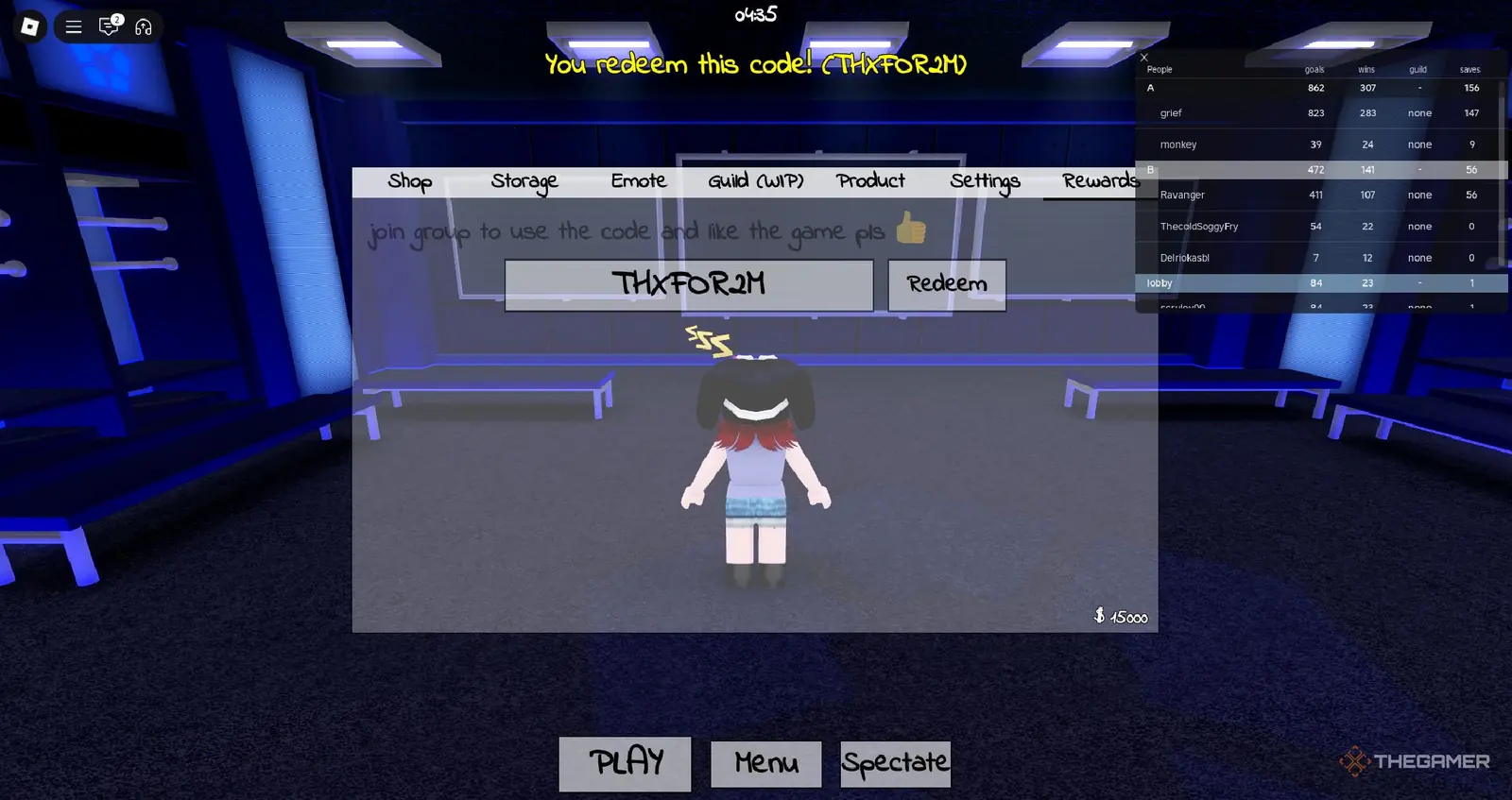
Join the [B:S] Azure Latch Team Roblox group, open the lobby Menu, choose Rewards, type the code, and press Redeem.
Redeem in four steps
- Join the [B:S] Azure Latch Team community.
- Open Azure Latch on Roblox and open the lobby Menu.
- Select Rewards and paste the exact code from the current list.
- Choose Redeem to submit it.
Fix a rejected code
Check letter case
Preserve uppercase letters exactly as printed in the code table.
Remove extra spaces
Remove leading or trailing spaces from copied text.
Check expiry and source disagreement
Look up the code in the expired archive; a Sources disagree label preserves conflicting public reports.
Check community membership
The published instructions require membership of the [B:S] Azure Latch Team community on the account redeeming the code.
The group id on the Roblox community page is 35316274. A board behind the Rewards panel in a public screenshot says to join the group and like the game before the code will take. That matches the wiki steps.
Codes are case sensitive. A space copied from a chat message is enough to miss. If the word is already in the expired archive, the box will not pay it out again.
A 6-digit computer code is a Roblox account prompt, not a reward code. Azure Latch reward codes are the longer words on the codes page, such as the November candy batch.
Mobile and console use the same Rewards tab. I do not have a published map of the on-screen buttons, so I am not assigning Xbox or PlayStation glyphs to this menu.
When a code fails, check four things in order: the letters and the case, stray spaces, whether the archive already lists it, and whether the account is in the group.
Questions
Why does the Rewards box reject a code?
The usual causes are case, an extra space, an expired code, or an account that has not joined the [B:S] Azure Latch Team group.
Do I need to like the game?
The board in the Rewards screenshot asks for a like as well as the group join. The wiki states the group requirement directly.
Where are the current codes?
The November 2026 list, with source counts, is on the codes page. This page is only the steps.
Sources
- Fandom – Codes — checked 2026-11-12
- Roblox game page — checked 2026-11-12
- Roblox group — checked 2026-11-12